

Choosing a model
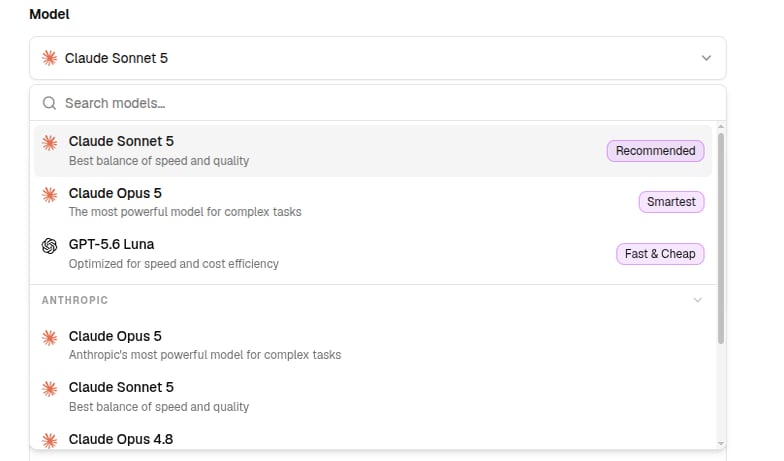
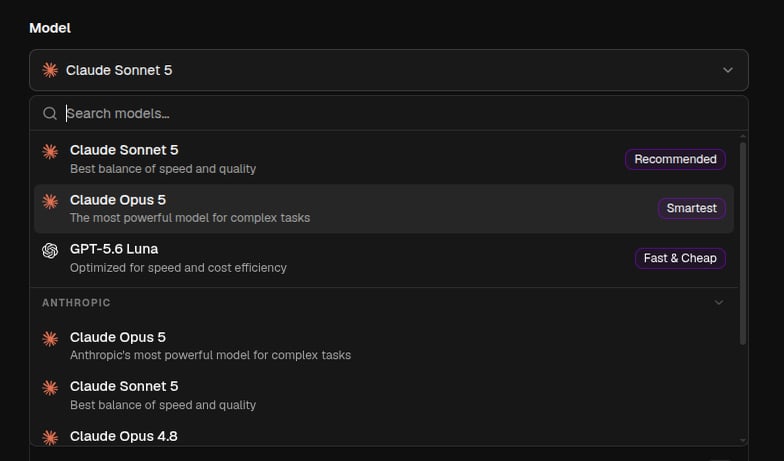
The model picker groups models by provider and highlights quick picks:- Recommended - best balance of speed and quality for most agents
- Smartest - deepest reasoning for hard analytical work
- Fast & Cheap - high-volume, low-latency tasks
Default models
The default model runs the QX agent and is pre-selected whenever someone creates a new agent. Set it in Settings → Agent Defaults, which has two cards:- Organization default sets the model and reasoning effort for everyone. Only owners and admins can change it, and the Allow members to set their own default switch decides whether others may override it.
- Your default overrides the organization’s choice for you, for QX and the agents you create.
!fast and !smart commands use. Leave one unset and it uses the next level up, your organization’s choice and then the platform’s. Changes save as soon as you make them, and any agent can still be set to its own model in the editor.
Writing instructions
Instructions are the agent’s system prompt (up to 100,000 characters). You don’t have to write them yourself, the builder drafts and iterates them with you. Good instructions typically cover:- Role - who the agent is and who it works for
- Task - what it should do, step by step where order matters
- Rules - what it must always or never do
- Output - the format and tone of a good answer
- Context - company background, product names, terminology
Advanced settings
The Advanced panel in the Instructions section fine-tunes how the model runs. It holds two controls. Reasoning effort sets how hard reasoning-capable models think before they answer (models without a reasoning mode ignore it). Raise it when answers come back shallow or skip steps; lower it for speed and lower credit use on simple, high-volume work.
Context management decides what happens when a conversation grows long enough to fill the model’s context window.
- Auto-summarize long context is on by default. The agent compacts earlier turns automatically as the conversation nears the limit, so it never runs out of room. Leave it on unless you need the full history kept word for word.
- Summarize threshold sets how many tokens the conversation can reach before it compacts, anywhere from 50k to 400k, or leave it on Use default. Lower it to summarize sooner and keep replies fast; raise it to hold more detail before compacting.